Conversations
Read, monitor, and take over live chats from every channel in one inbox.
Conversations is your shared inbox. Every chat your agent has — on your website, Instagram, Messenger, WhatsApp, or email — lands here in real time, so you can watch what's happening and step in when a human touch helps.
The inbox
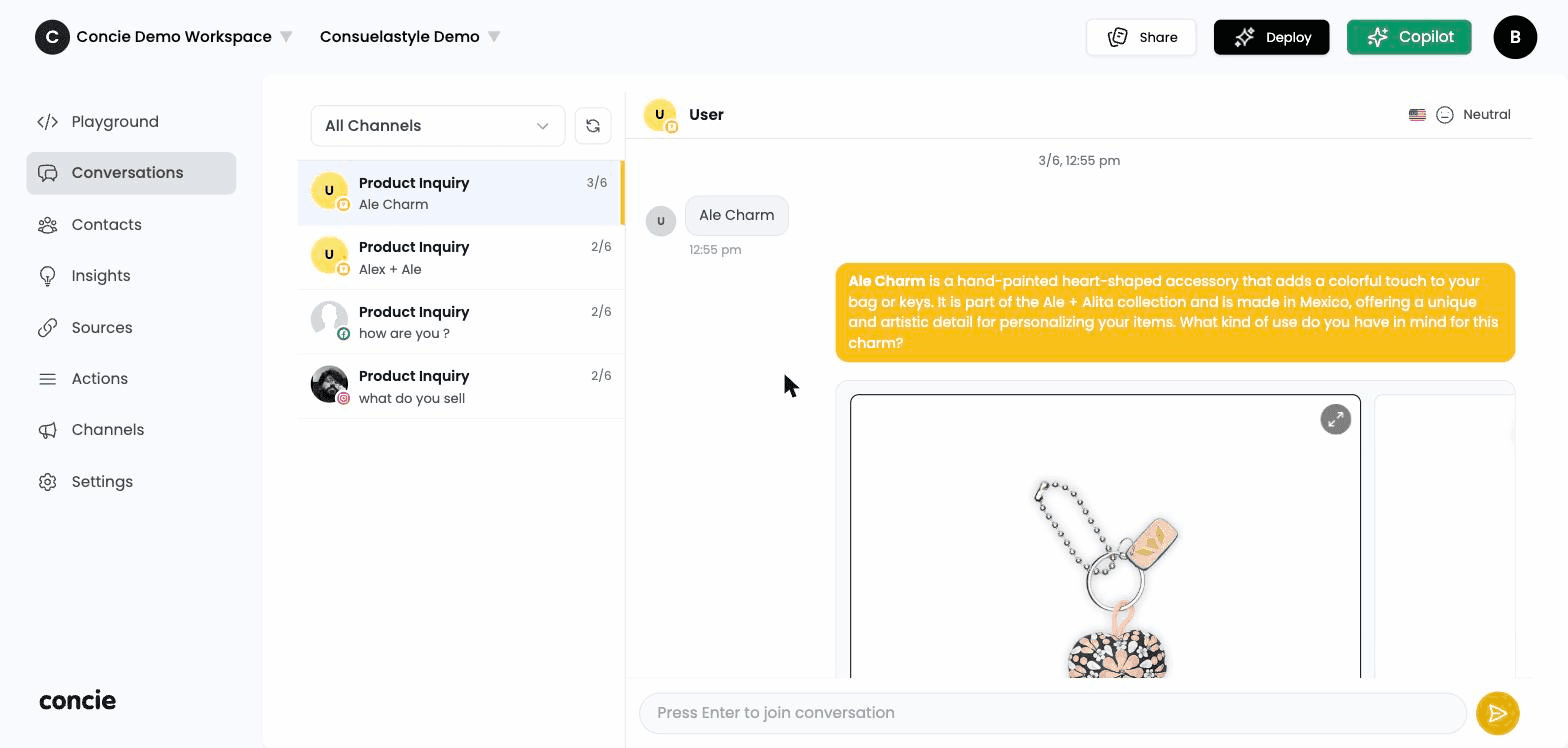
Open Conversations in the sidebar. The list shows every chat session with, for each row:
- The contact (name or identifier) and a channel icon (web, Instagram, Messenger, WhatsApp…)
- A preview of the last message and its timestamp
- A status badge — Active, Joined (a human has taken over), or Released
New messages stream in live, so the inbox updates without a refresh.
What you can do
- Open a thread to read the full conversation, including the agent's replies, product cards, and any forms the customer submitted.
- Take over (human handoff). Join a conversation to reply yourself. While you're joined, the agent steps back. A joined chat auto-releases after a few minutes of inactivity so the agent can resume.
- See contact info alongside the thread — email, channel, country, and other details captured during the chat.
- Search by contact or message text, and filter by channel to focus on one platform.
Conversations and contacts are linked: open a contact from a thread to see their full history, or jump from Contacts into any of their conversations.